Skip to content

For restaurants, cafés & bakeries

Every plate billed. Every rupee counted.

Billing, kitchen orders, stock and GST in one simple program on your own PC. Built for the lunch rush, the late-night cash count and the bakery’s morning bake.

  • Dine-in restaurants
  • Cafés & tea stalls
  • Bakeries & sweet shops
  • Takeaway & cloud kitchens
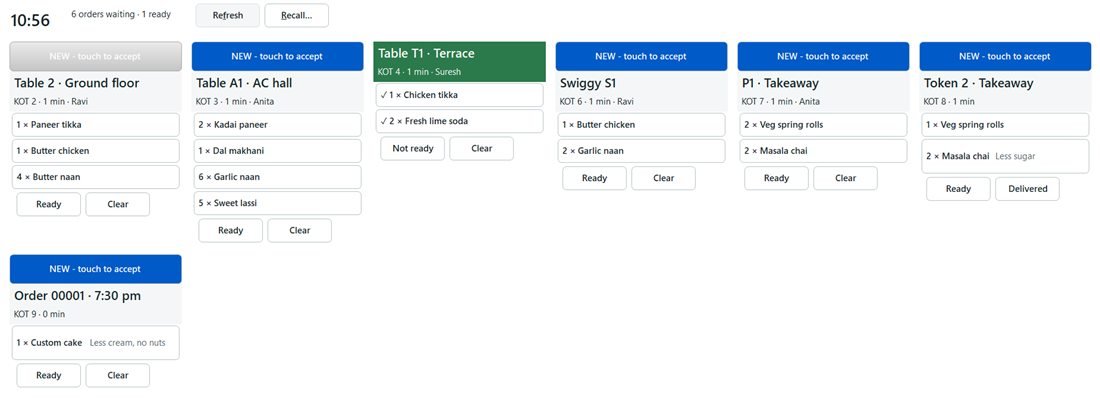
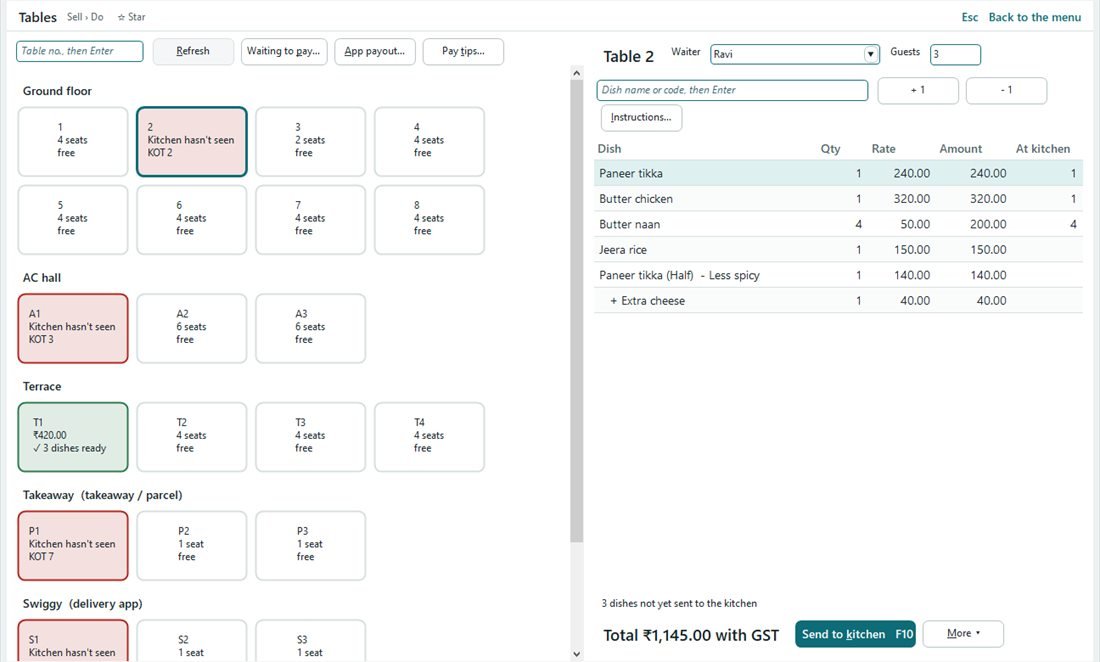
Tables screen showing the floor by section with free and busy tables, and Table 2’s order with dishes, a half plate and add-onsKitchen screen with one card per order for tables, a delivery app, takeaway and tokens, with Ready and Clear buttons

Sound familiar?

Five money leaks every restaurant knows.

  • The cook says the order never came.

    With Aero: Every order reaches the kitchen as a numbered slip or on the kitchen screen.

  • That dish was cancelled… after it was cooked.

    With Aero: A dish goes back only with a reason and the manager’s PIN.

  • The cash drawer is ₹600 short. Again.

    With Aero: Each cashier counts at shift close; expected and counted side by side.

  • Yesterday’s cakes went in the bin.

    With Aero: Older stock sells first, and at closing you see what expires today.

  • Swiggy and Zomato paid us. How much did they keep?

    With Aero: Record each payout and commission; see what the app still owes.

Tables & kitchen

Orders reach the kitchen. Every time.

Pick the table, add dishes, send. Only new dishes go, so nothing is cooked twice.

  • Half or full plate, “no onion” or “Jain” in one touch
  • Kitchen cards turn yellow, then red, when an order waits too long
  • Ready flows back to the table, the counter and the customer screen
  • The kitchen PC needs no licence
Kitchen screen with one card per order for tables, a delivery app, takeaway and tokens, with Ready and Clear buttons
One card per order, touch to accept.

New in 1.0.15 · Quick billing

Busy counter? Touch, touch, Cash.

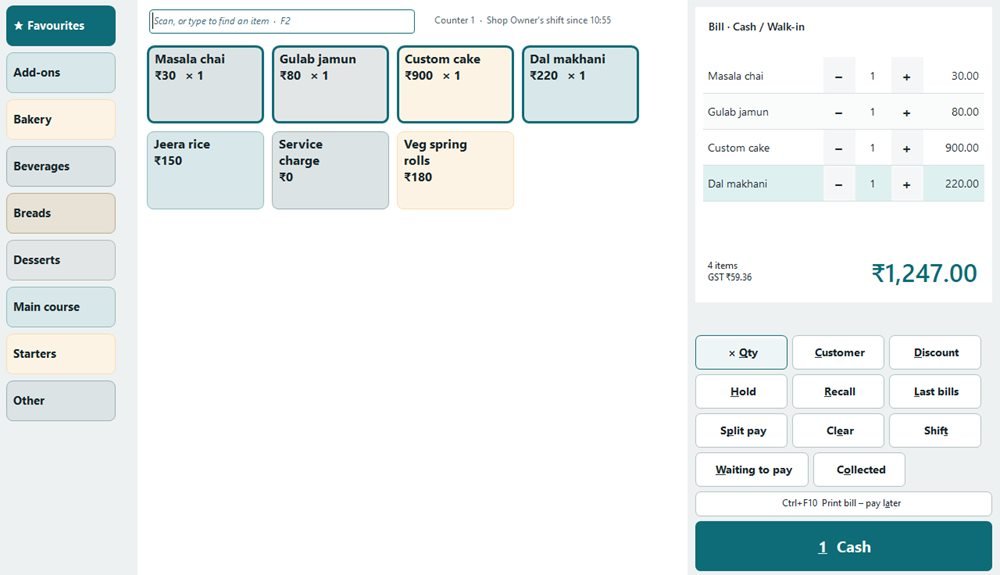
For tea counters, bakeries and takeaway windows: every item is a big button, so nobody types.

  • Favourites first, then a tab for each category
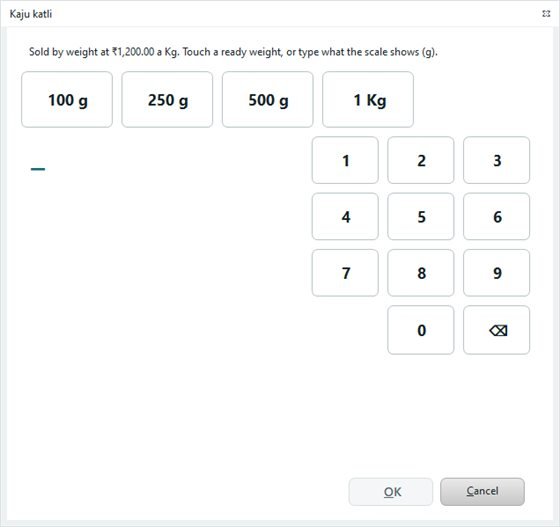
  • Sweets by the kilo: touch 250 g and the price works itself out
  • One touch on Cash or UPI saves and prints; UPI shows the exact-amount QR
  • Same bill, GST and stock as the regular counter
Quick billing screen with category tabs, big item buttons and the bill with one-touch CashWeight pad with ready weights of 100 g, 250 g, 500 g and 1 kg

Recipes & food cost

Sell a plate, the stock follows.

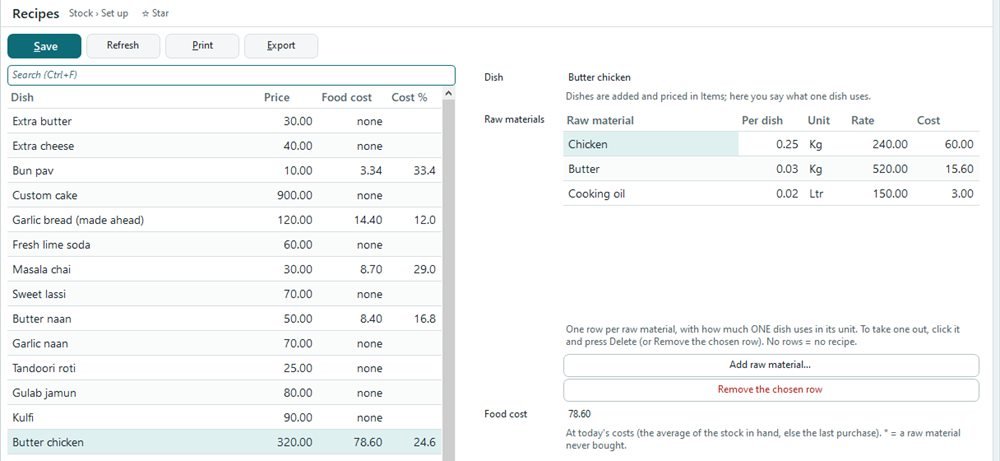
Write each recipe once. Aero shows the food cost and food cost % of every dish at today’s prices.

  • Raw materials leave stock as you sell
  • A half plate uses half the recipe
  • Purchases at real cost, with GST for 5 % or 18 % restaurants
Recipes screen: Butter chicken uses chicken, butter and cooking oil, food cost 78.60 or 24.6 percent
Butter chicken at 24.6 % food cost.

Bakeries & sweet shops

Know what you make, what it costs and what you throw away.

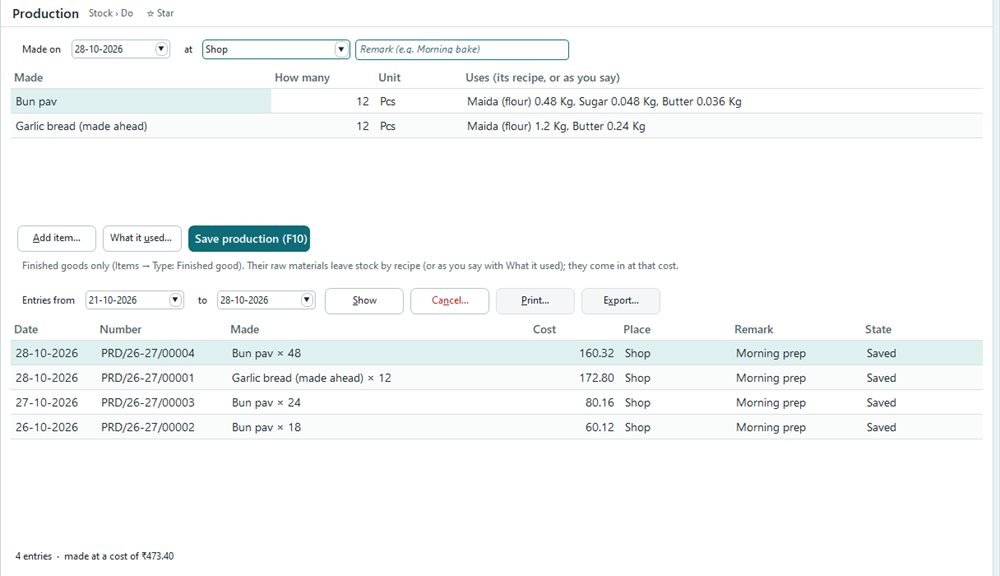
Enter the morning bake; flour, sugar and butter leave stock and the buns come in at their real cost.

  • The oldest good batch sells first, never an expired one
  • Day-end leftovers: write off or sell at a discount tomorrow
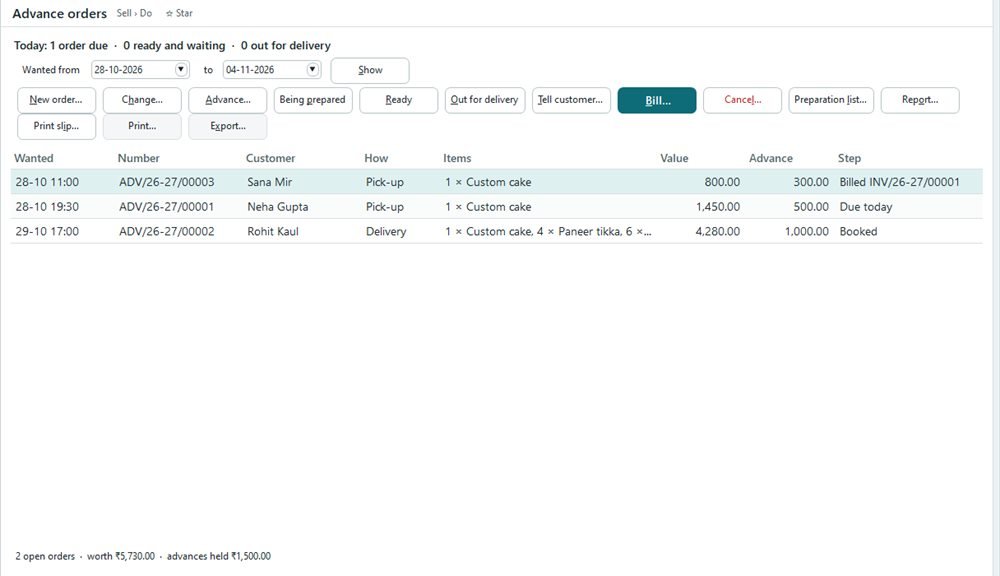
  • Cake and party orders with advance, pick-up or delivery
Production entry showing today’s bake and the raw materials each item usedAdvance orders screen listing cake orders from booked to billed, with advances paid

Money & the owner

The drawer tallies. You know your day.

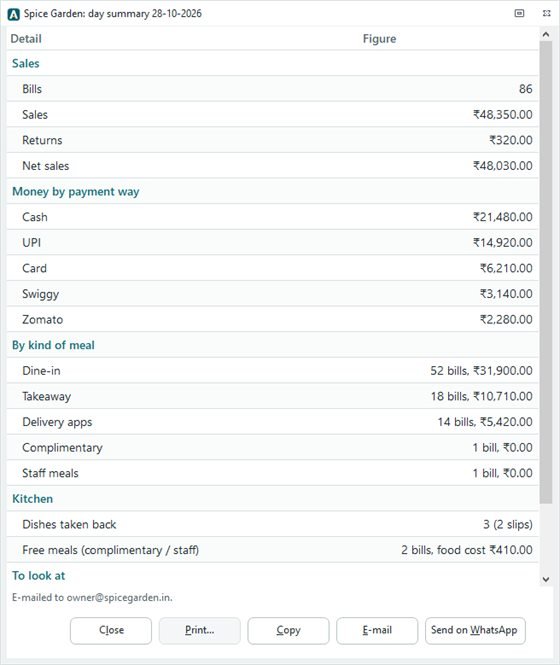
Shifts per cashier, bill first and pay after, tips counted fairly, and at closing the whole day reaches you on WhatsApp.

  • Cash, UPI, card and each delivery app on one summary
  • Dishes taken back and free meals, with their food cost
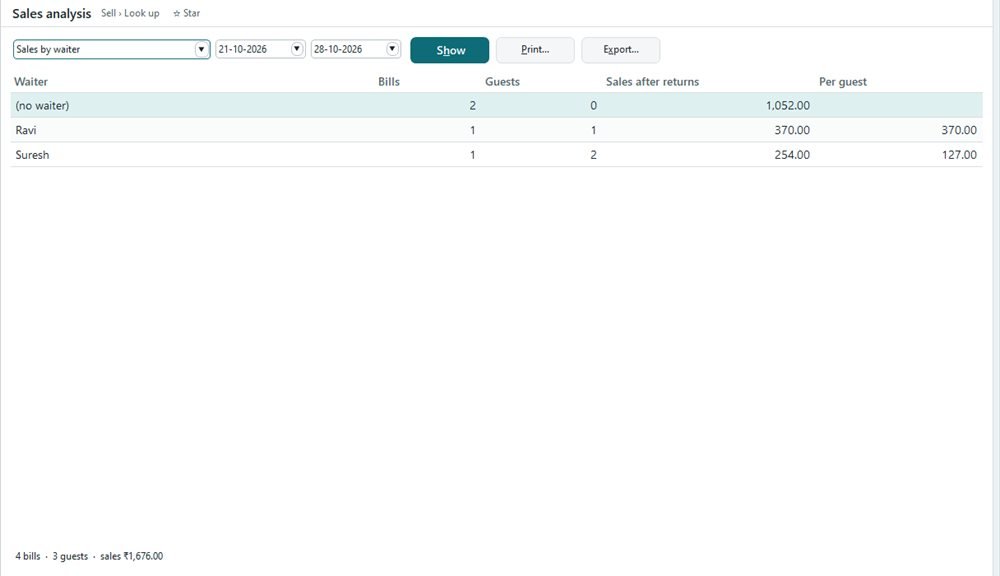
  • Reports by waiter, table and kind of meal, to PDF or Excel
Sales analysis by waiter with bills, sales and tipsDay summary with 86 bills, net sales of ₹48,030, money by payment way and kind of meal, and a Send on WhatsApp button

Your data

Where is your restaurant’s data kept tonight?

With Aero Next the answer is simple: on your own PC, in your restaurant, not on our servers. No bill is ever deleted, every change shows who and when, and your GST returns come from the same bills.

Getting started

Billing on day one.

  1. Day 1

    We set it up: install, bring in your menu from Excel, add tables and printers.

  2. Week 1

    Your team learns: cashiers, waiters and kitchen in an hour, videos on F1 for the rest.

  3. 45 days

    Try it free: the full program in your shop. Activate when you’re sure; nothing is lost.

FAQ

Before you call us

Does Aero Next work without internet?

Yes. Billing, the kitchen screen and stock run on your shop’s own PCs and network. Internet is only needed to send e-mail or WhatsApp.

What do I need to run Aero Next?

A Windows 10 or 11 PC (64-bit), an 80 mm bill printer, and optionally a kitchen printer, a kitchen screen or a customer display. One setup file installs everything on the main PC.

How many PCs and counters can I use?

You choose the users, counters and PCs in your licence. The kitchen-screen PC never counts against it.

Can my staff learn it quickly?

Every screen has short help videos on F1, in English and Urdu. Quick billing needs no typing at all.

Is Aero Next ready for GST?

Yes: GST on every bill, GSTR-1 and GSTR-3B from your own bills, and delivery-app orders kept apart as section 9(5) needs.

I use the old Aero Billing. What about me?

Your support continues with no end date, and help moving to Aero Next is free.

See it with your own menu.

Free demo · 45-day free trial · we help you enter your menu.

© 2026 SHYN Technologies. All rights reserved.

AI · Microsoft 365 · Cloud · Cyber security · IT talent · Aero Next